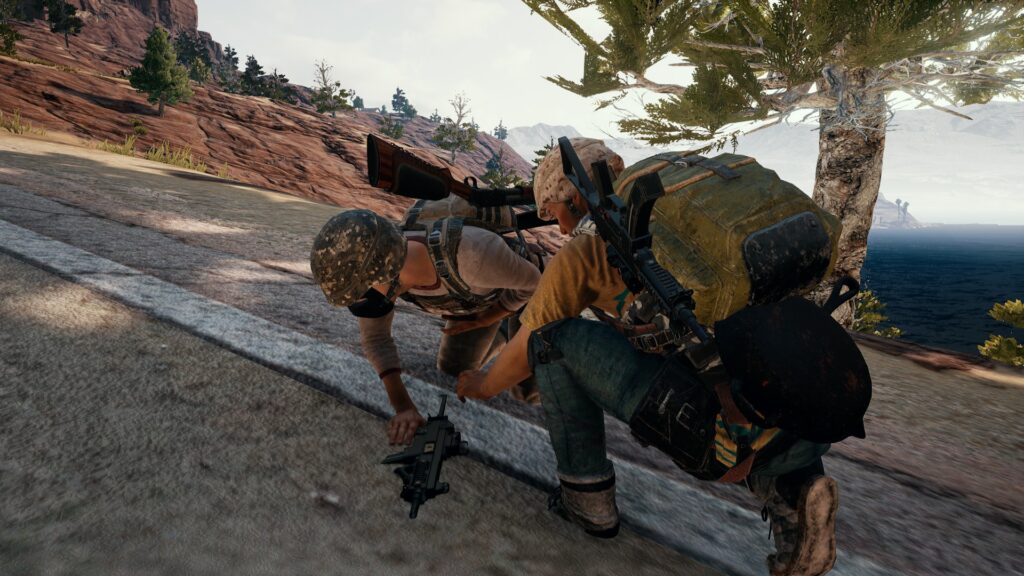
PlayerUnknown’s Battlegrounds, commonly known as PUBG PC, drops up to 100 players onto vast maps where the sole objective is to outlast everyone else and claim that elusive Chicken Dinner victory. The game combines precise mouse-and-keyboard controls with strategic decision-making, creating a high-stakes environment that rewards patience, awareness, and adaptability. For beginners, the learning curve feels steep because every choice—from the initial parachute drop to the final circle—can mean the difference between an early elimination and a top-10 finish. This guide breaks down essential mechanics and strategies into clear, practical steps that build foundational skills while encouraging steady improvement over time.
New players often overlook how PUBG PC emphasizes survival over constant aggression, especially in the early stages. The maps feature diverse terrain, from dense urban areas to open fields, and dynamic elements like the shrinking safe zone force constant repositioning. Understanding these core elements helps reduce frustration and accelerates progress. Resources such as the PUBG beginner’s guide on GameSpot highlight how mastering basics like inventory management and zone awareness can dramatically shorten the time it takes to see consistent results.
Setting Up for Success: Controls, Settings, and Sensitivity
Before jumping into a match, optimizing controls and settings lays the groundwork for smoother gameplay. PUBG PC offers extensive customization options that directly impact responsiveness and comfort during intense moments. Start by setting the display to fullscreen mode with a render scale of 100 percent and disabling unnecessary visual effects like motion blur or shadows to maintain higher frame rates on most systems. These adjustments ensure the game runs fluidly, allowing focus on decision-making rather than technical hiccups.
Key bindings play a critical role in quick reactions. The X key holsters the weapon to enable faster sprinting, while Alt allows free-look in third-person view without rotating the character body. Leaning with Q and E provides safe peeks around cover, and the M key brings up the map for constant zone monitoring. Players benefit from rebinding crouch and prone actions to easily accessible keys for fluid movement transitions during fights.
Sensitivity settings require careful calibration because they influence aiming precision across different scopes and distances. Beginners should begin with default values and gradually tweak them in the training mode, aiming for a general sensitivity around 30 to 40 at 800 DPI for balanced control. Vertical sensitivity typically sits near 1.0 to prevent over-correction during sprays. Pro player data reveals that consistent setups across aim, ADS, and scope sensitivities—often in the 25-to-50 range—help build muscle memory faster. Detailed recommendations appear in PUBG pro settings and gear lists on Prosettings.net, which analyze top competitors’ configurations to guide newcomers toward reliable starting points.
Audio settings deserve equal attention since sound provides the earliest warnings of nearby threats. High-quality headphones reveal subtle cues like footsteps on grass versus wood or distant vehicle engines. Enabling enhanced audio options and adjusting volume sliders ensures these elements stand out without overwhelming gunfire sounds.
Mastering the Drop: Choosing Landing Spots and Initial Priorities
The parachute descent sets the tone for the entire match, so selecting a landing location based on the plane’s flight path proves decisive. Hot drops near major cities or military bases deliver high-tier loot but attract heavy competition, making them ideal for practicing combat under pressure once basic mechanics feel comfortable. Safer alternatives include smaller clusters of buildings away from the flight line, where players can loot undisturbed and rotate toward the safe zone early.
Flight path awareness comes from observing the lobby map before the game starts. Multiple backup spots should always remain in mind because the circle’s position can shift unpredictably. Once on the ground, immediate priorities shift to securing a primary weapon, level-two armor if available, and basic medical supplies. Buildings with closed doors generally indicate unlooted interiors, while open doors signal recent activity and potential remaining players.
Efficient landing techniques involve pulling the parachute at the right altitude to maximize glide distance while maintaining speed. Gliding at 20 to 24 kilometers per hour allows coverage of greater distances toward preferred zones without sacrificing momentum. As noted in established PUBG tips and tricks compilations on Rock Paper Shotgun, quiet drops in isolated areas provide breathing room to gather essentials before engaging threats.
Efficient Looting: Prioritizing Gear and Managing Inventory
Looting demands speed and selectivity because time spent in one building exposes players to ambushes. Prioritize a primary assault rifle or shotgun for immediate defense, followed by a helmet, vest, and backpack to increase survivability and carrying capacity. Ammunition for the equipped weapon should fill at least 120 rounds, with medical items like bandages and first-aid kits rounding out the loadout. Grenades and energy drinks offer tactical advantages later, but they come secondary to core survival gear.
Inventory management improves through practice with the Tab menu, which allows quick dragging of items while scanning surroundings. Auto-equip features for attachments can save precious seconds, and discarding low-value items such as excess pistol ammo frees space for essentials. Level-three backpacks expand capacity significantly, but even level-one versions outperform starting with nothing.
Buildings serve as the richest loot sources, particularly larger structures like apartments or warehouses. Players should clear rooms methodically, checking corners and upper floors before committing to prolonged searches. The PUBG beginners guide on Overgear emphasizes how focusing on high-utility items early prevents wasteful scavenging in later phases.
Movement and Positioning: Staying Mobile and Aware
Movement in PUBG PC balances speed with stealth because constant running creates noise that travels far. Holstering the weapon boosts sprint speed by several percent, while crouch-walking or going prone reduces visibility and sound output in critical areas. Vehicles provide fast rotation across maps but generate engine noise that broadcasts positions to anyone within earshot, so they work best for crossing open fields when the zone forces relocation.
Positioning revolves around using natural cover like trees, ridges, and buildings to break line of sight. Third-person perspective allows peeking over obstacles without full exposure, and free-look scanning maintains 360-degree awareness. Sound awareness complements movement by revealing enemy locations through footsteps or reload sounds, enabling preemptive ambushes or retreats.
The blue zone contracts progressively, with later circles shrinking faster and dealing increasing damage. Monitoring the map timer helps plan rotations that avoid unnecessary exposure. Straddling the circle edge sometimes yields overlooked loot or surprise attacks on players funneling inward. Comprehensive map strategies and zone management advice on Green Man Gaming detail how these patterns influence successful positioning across different maps.
Combat Fundamentals: Aiming, Recoil Control, and Attachments
Combat success stems from controlled engagements rather than spray-and-pray tactics. Aiming fundamentals improve through consistent practice in training mode, where players test different weapons and scopes to develop muscle memory. Recoil patterns vary by gun, so tapping or short bursts maintain accuracy at medium ranges, while full-auto sprays require downward mouse pulls to compensate.
Attachments transform weapon performance dramatically. Suppressors reduce muzzle flash and sound, extended magazines increase capacity, and grips stabilize recoil patterns. Red-dot or holographic sights suit close-quarters fights, while 4x or 6x scopes excel at longer distances. Matching attachments to the primary weapon loadout creates versatile setups capable of handling multiple scenarios.
Grenades add layers to fights: frag grenades clear rooms or flush enemies from cover, smoke grenades provide temporary vision blocks for revives or advances, and stun grenades disrupt aiming temporarily. Throwing arcs appear when holding the fire button, allowing precise placement even behind obstacles. As highlighted in practical combat tips from GearUP Booster’s PUBG guide, understanding these tools turns defensive situations into opportunities.
Vehicle Usage, Map Awareness, and Late-Game Rotations
Vehicles accelerate travel but require strategic deployment. Jeeps and buggies handle rough terrain well, yet their noise profile makes them poor choices near populated zones. Dacia sedans offer speed on roads but flip easily on hills. Parking vehicles behind cover preserves their utility for emergency extractions.
Each map presents unique characteristics that influence playstyles. Erangel features balanced urban and rural areas with reliable vehicle spawns, while Miramar emphasizes long sightlines and desert traversal. Familiarity with named locations and common loot densities helps predict player traffic and safe rotation paths.
Late-game circles force tighter positioning, where third-party fights become common. Holding high ground or compound edges provides defensive advantages, and pre-aiming common entry points maximizes survival odds. Boost items like painkillers and energy drinks restore health over time and grant movement speed bonuses, proving vital when the zone closes in rapidly.
Comparison Table: Essential Gear Priorities for the First Five Minutes
Gear Priority Breakdown: What Matters Most Right After Landing
| Priority Level | Item Category | Recommended Focus | Reason for Priority | Alternative if Unavailable |
|---|---|---|---|---|
| 1 (Immediate) | Primary Weapon | Assault rifle or shotgun | Provides instant defense against threats | Pistol or melee as temporary hold |
| 2 (Critical) | Armor and Helmet | Level 1 or 2 vest and helmet | Reduces incoming damage by up to 40% | Skip lower levels only if under fire |
| 3 (Essential) | Backpack | Level 1 backpack | Increases inventory slots for ammo and meds | Utility belt only if absolutely necessary |
| 4 (Supportive) | Medical Supplies | Bandages, first-aid kits | Enables quick healing during rotations | Energy drinks for minor boosts |
| 5 (Tactical) | Ammunition and Scope | 120+ rounds and red-dot sight | Sustains early engagements without reloads | Iron sights for very short fights |
This table summarizes loot decisions that beginners encounter constantly. Following the order prevents scattered inventories and keeps players combat-ready within the first few minutes.
Advanced Beginner Strategies: Building Habits That Scale
As matches progress beyond the initial chaos, habits like pre-firing common angles or using throwables to create diversions separate improving players from those stuck in early eliminations. Observing patterns in player movement—such as rotations toward the center of the circle—allows anticipation of third-party opportunities. Consistent practice in custom matches or training grounds hones these instincts without the pressure of live competition.
Team coordination in duos or squads amplifies individual strengths through callouts and shared resources. However, solo play sharpens personal decision-making by removing reliance on teammates. Both formats reinforce the same core principles of positioning and resource management.
FAQ: Common Questions from New PUBG PC Players
What is the best starting sensitivity for beginners?
Most newcomers perform well with a general sensitivity of 30 to 40 at 800 DPI and vertical sensitivity at 1.0. These values offer control without excessive wrist strain, and adjustments should occur gradually after several matches.
How should players handle the blue zone effectively?
Monitor the map timer and rotate early to avoid taking unnecessary damage. Staying just inside the edge often positions players ahead of stragglers while minimizing exposure to fights in the center.
Which weapons work best for beginners?
Assault rifles like the M416 or SCAR-L provide forgiving recoil and versatility across ranges. They pair well with basic attachments and require less precision than snipers or SMGs in early learning phases.
Is hot-dropping recommended for new players?
Hot drops accelerate combat experience but increase early death frequency. Safer landings allow time to master looting and movement before engaging frequently.
How important are headphones in PUBG PC?
Headphones rank among the most impactful upgrades because directional audio reveals enemy positions long before visual confirmation, directly improving survival rates.
What inventory management tips prevent overload?
Prioritize ammo for the current weapon, stack healing items, and drop low-value attachments. Use the Tab menu frequently to reorganize without stopping movement entirely.
When should players use vehicles?
Vehicles excel for long-distance rotations when the zone shifts far away, but they should remain parked behind cover to avoid drawing attention during quiet phases.
How do attachments affect weapon performance?
Grips reduce recoil spread, magazines increase capacity, and scopes improve accuracy at distance. Matching the right combination to the situation turns average guns into reliable tools.
Is training mode sufficient for practice?
Training mode allows unlimited testing of recoil patterns, vehicle handling, and throwable arcs, making it the ideal environment to refine mechanics before live matches.
What common mistake leads to most beginner deaths?
Exposing positions through unnecessary gunfire or failing to reposition when the zone moves often results in avoidable eliminations. Patience and map awareness mitigate these risks.
Conclusion: Turning Knowledge into Consistent Chicken Dinners
PUBG PC rewards players who combine mechanical proficiency with strategic foresight, and beginners who internalize these fundamentals see rapid improvement in both survival time and overall enjoyment. From optimizing settings and sensitivity to mastering drops, looting priorities, movement techniques, and combat engagements, every element interconnects to create a cohesive playstyle. The comparison table and FAQ sections serve as quick references that reinforce these concepts during actual matches, while map awareness and zone management ensure adaptability as games evolve.
Consistent practice remains the most reliable path forward. Regular sessions in training mode build the muscle memory needed for recoil control and quick decisions, and reviewing death replays highlights recurring patterns worth addressing. Over time, these habits transform hesitant beginners into confident competitors capable of navigating the final circles with composure. The game continues to evolve with updates that introduce fresh mechanics and balance adjustments, yet the core principles of positioning, resource management, and sound awareness endure as universal keys to success.
By focusing on one area at a time—such as improving loot efficiency in a single session or testing new sensitivity values—the learning process stays manageable and rewarding. PUBG PC offers endless variety across its maps and modes, inviting players to experiment and refine approaches that match their preferred pace. With these tips applied thoughtfully, newcomers gain the tools necessary to survive longer, engage more effectively, and ultimately experience the satisfaction of securing victories on their own terms. The Battlegrounds await, and every match presents another opportunity to apply these strategies toward that next Chicken Dinner.